Please select your app store region

UNITED STATES

CANADA




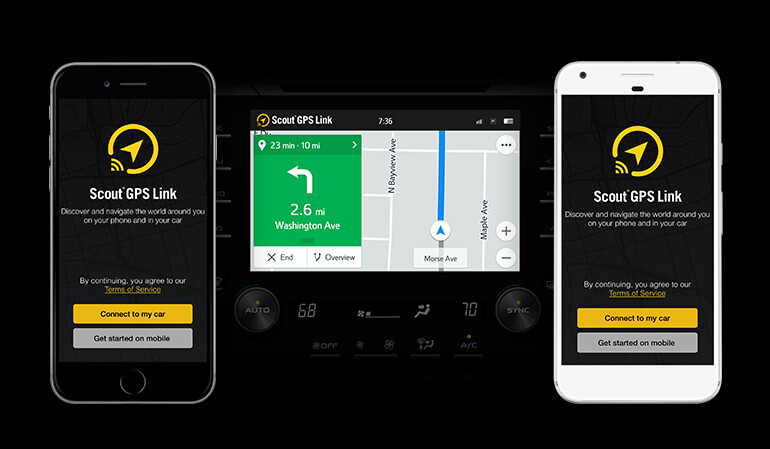

Scout GPS Link is no ordinary mobile navigation app. Not only is the app with you wherever you go, it's designed exclusively for your car’s multimedia screen to give you an effortless navigation experience while you drive. Wherever you’re going, Scout GPS Link makes navigating there a lot easier.

Journey from your phone to your car effortlessly. Use Scout GPS Link on your phone to search, see available routes to your destination, and take advantage of the enhanced in-car experience* by connecting your phone via Bluetooth™ and USB.
In the world of mobile software repair and unlocking, having the right utility tools is essential for technicians. The MRT HW Flash Tool is one such utility that has gained popularity for its ability to handle various Android devices, particularly those with specific chipset architectures. With the release of Version 3.9, the tool has introduced broader support and enhanced functionalities.
This article covers the key features of MRT HW Flash Tool V 3.9, the devices it supports, and what you need to know before downloading it.
MRT HW Flash Tool is a small but powerful utility designed primarily for servicing Android devices. While the "MRT" brand is famously associated with the MRT Key Dongle (a hardware device used for unlocking and repairing complex mobile issues), the HW Flash Tool is often released as a standalone or companion utility. It allows technicians to flash firmware (ROMs), bypass security locks, and fix devices stuck in bootloops or those suffering from software corruption.
Unlike official manufacturer tools (like Samsung Odin or Xiaomi Mi Flash), third-party tools like MRT HW are designed to work across various chipsets, making them a valuable "Swiss Army knife" for repair shops.
If you want, I can:
(Invoking related search suggestions now.)
MRT HW Flash Tool V 3.9 is a specialized utility used primarily for flashing firmware and bypassing Factory Reset Protection (FRP)
on Huawei and Honor smartphones. While it was originally designed as a component of the MRT (Mobile Repair Tool) Dongle software suite, "cracked" versions allow it to be used without a physical hardware dongle. Key Features FRP Bypass
: Specifically targeted at removing Google account locks (FRP) on Huawei devices, including models like the Y9 2019. Firmware Flashing
: Supports writing full stock ROMs (firmware) or board software to devices to fix boot loops or system errors. Fastboot Mode Support : Capable of flashing UPDATE.APP or XML files while the device is in Fastboot mode. Test Point Compatibility
: Often used in conjunction with "Test Point" methods to force the phone into a state where the tool can communicate with the hardware directly. Downloading the Tool
You can find community-shared versions of the tool through the following sources (use at your own risk): Google Drive Setup : A common shared MRT HW Flash Tool V 3.9 file is available on Google Drive. Community Forums
: Technical guides and links are frequently updated on forums like Video Tutorials : Developers and technicians often provide direct download links
in video descriptions for specific versions like 3.9 or 6.1. Google Drive Basic Usage Steps Extract the Tool : Download and extract the ZIP file to your PC. Install Drivers : Ensure you have the necessary HUAWEI USB COM 1.0
or MediaTek drivers installed for your computer to recognize the phone. Load Firmware
: Open the tool, navigate to the "Write Flash" tab, and select your firmware's or scatter file. Connect Device
: Power off the phone and connect it to the PC while holding the Volume buttons or using the designated Test Point. : Click "Start" in the tool to begin the process.
: Using third-party flashing tools can permanently "brick" your device if the wrong firmware is applied. Always back up your data and ensure your battery is at least 50% charged. for your specific Huawei model?
The MRT HW Flash Tool V 3.9 is a specialized utility primarily used for repairing and servicing Huawei and Honor smartphones. It is widely recognized in the mobile repair community for its ability to bypass FRP (Factory Reset Protection), flash firmware, and unlock accounts on devices powered by Kirin and Qualcomm chipsets. Key Features of MRT HW Flash Tool V 3.9
FRP Bypass: Easily remove Google Account locks after a factory reset.
Firmware Flashing: Update or downgrade Huawei/Honor OS to fix system errors or boot loops. Account Unlocking: Reset Huawei IDs and other screen locks.
Bootloader Support: Tools to assist in managing or unlocking bootloaders on compatible models.
COM Port Communication: Specifically designed to work with devices in "USB COM 1.0" mode for deep-level repairs. How to Use the Tool
Download & Install: Obtain the tool and necessary USB drivers (Huawei USB COM 1.0 drivers are often required).
Connection: Connect your Huawei device to the PC using a USB cable. Depending on the task, you may need to use a test point to enter the correct mode.
Model Selection: Launch the tool and select the correct device model or chipset (e.g., Kirin 710, 980).
Execute Operation: Click "Scan" to detect the device, then select "Flash It" or "FRP Reset" to begin the process. Important Considerations
Hardware Dongle: Most official versions of the MRT (Mobile Repair Tool) require a physical MRT Dongle to function. Ensure your version is compatible with your hardware.
Data Risk: Flashing or resetting your device typically wipes all user data. Always backup if possible. Mrt Hw Flash Tool V 3.9 Download
Security: Only download from reputable mobile repair forums to avoid malware.
For general Android flashing needs, you might also consider the Android Flash Tool for development purposes or the SP Flash Tool for MediaTek-based devices. AI responses may include mistakes. Learn more
The MRT HW Flash Tool V 3.9 (part of the larger MRT Dongle ecosystem) is a specialized software utility used by mobile technicians to repair, flash, and unlock Android devices, specifically focusing on brands like Huawei , Xiaomi, and Meizu.
This version is widely sought after for its ability to handle complex tasks like FRP (Factory Reset Protection) bypass, account removal, and IMEI repair on devices powered by MediaTek (MTK), HiSilicon, and Qualcomm processors. Key Features of MRT HW Flash Tool V 3.9
FRP & Account Removal: One-click solutions for bypassing Google account locks and removing Mi/Huawei IDs.
Bootloader Management: Capability to both unlock and relock bootloaders on Huawei devices.
Broad CPU Support: Optimized for HiSilicon and Qualcomm-based Huawei phones, as well as various MTK-powered brands like VIVO and Oppo.
Stock ROM Flashing: Allows users to flash official firmware to fix bricked devices or software glitches.
Repair Functions: specialized tools for IMEI repair and partition management. How to Use the Tool for Huawei Devices
Preparation: Ensure you have the MTK USB Drivers installed on your PC so the software can communicate with the phone.
Launch & Select: Open the tool and select the correct model or CPU type from the Huawei tab.
Connection: Power off the device. Connect it to the PC via USB while holding the Volume Up or Volume Down key (depending on the specific model) to enter flash mode.
Execute: Click the "Download" or "Start" button to begin the flashing or unlocking process. A green ring or "Success" message will indicate completion. System Requirements OS: Windows 7, 8, 10, or 11 (64-bit recommended).
Hardware: A physical MRT Dongle is typically required for official versions, though some users search for "loaders" to bypass this requirement.
Drivers: Correct Huawei or MTK VCOM drivers are essential for device detection.
Important Note: Always backup your data before using any flashing tool, as these processes typically erase all personal files on the device. MRT Dongle - Все запчасти
The MRT (Mobile Repair Tool) Dongle is a specialized software repair utility used by technicians to service Android mobile phones from brands like Meizu, Xiaomi, Vivo, Huawei, and Coolpad. Unlike standard Windows utilities, this "flash tool" is specifically designed for devices using MediaTek (MTK) chips to perform deep-level repairs. Core Functions and Version 3.9
Version 3.9 of the MRT HW Flash Tool is a popular iteration used primarily for:
Decoding & Unlocking: Permanently decoding Android devices, removing screen passwords, and unlocking bootloaders.
FRP Removal: Bypassing Factory Reset Protection (FRP) on accounts like Mi (Xiaomi) and Samsung.
IMEI Repair: Fixing damaged or corrupted IMEI information on supported handsets.
Flashing Firmware: Installing official or custom stock ROMs to restore "bricked" or non-functional devices. How the Tool Operates
Technicians typically use a physical USB Dongle as a security key to run the software. The flashing process generally follows these steps:
Preparation: Launching the tool on a PC and selecting the specific device model and chipset.
Scatter Loading: Locating and loading a "scatter file" from a stock ROM folder, which tells the tool how to map the device's memory.
Connection: Connecting the smartphone via a USB cable (often while holding specific volume keys) to ensure the computer detects the hardware for flashing. Distinguishing MRT from Windows MRT
It is important not to confuse the Mobile Repair Tool with the Microsoft Windows Malicious Software Removal Tool (MRT). While both share the "MRT" acronym, the Windows version is a built-in security utility used only to scan for and remove malware from a PC. How to Use MRT Tool on Windows: Quick Fix Guide! [2024]
MRT HW Flash Tool V 3.9 is a powerful software utility used for flashing firmware, unlocking screen locks, and bypassing Factory Reset Protection (FRP) on Android devices, primarily focusing on brands like Huawei, Xiaomi, Oppo, and Vivo. In the world of mobile software repair and
Originally developed for use with the MRT (Mobile Repair Tool) Dongle, version 3.9 (often searched as v3.19 or v3.95) is frequently sought after by mobile technicians to service modern smartphones without requiring expensive specialized hardware. Core Features and Capabilities
Huawei Specialization: Specifically designed to handle Huawei devices, including flashing firmware and removing Huawei ID locks.
Lock Removal: Can bypass or remove screen locks (Patterns, PINs, Passwords) without data loss on certain older models.
FRP Bypass: One-click removal of Factory Reset Protection after a hard reset, allowing users to regain access to their devices.
IMEI Repair: Includes tools for repairing IMEI numbers and addressing network-related software issues.
Multi-Brand Support: While "HW" implies Huawei, the tool often supports models from Xiaomi (Mi Cloud unlock), Oppo, and Vivo. Version 3.9 vs. Others
While earlier versions like 2.60 were industry standards, V 3.9/3.19 includes updated loaders for newer chipsets, allowing for better compatibility with more recent Android versions. How the Tool is Typically Used
Driver Installation: Users must install proper USB drivers (MTK or Qualcomm) for the PC to recognize the phone.
Launching the Loader: Many available versions are "cracks" that use a loader to bypass the need for a physical MRT Dongle.
Connection: The device is usually connected in MTP, ADB, or Fastboot mode, depending on the specific operation required.
Hardware ID Activation: Some versions require generating a "key" using a Keygen based on the user's specific Hardware ID to unlock the software interface. Safety and Legitimacy Warning
Since the original MRT Key team has reportedly ceased official updates, many "MRT HW Flash Tool V 3.9" downloads are third-party cracks. Users should be cautious when downloading these files from unverified sites, as they often trigger antivirus warnings or may contain malware. It is recommended to use such tools in a virtual machine or a dedicated "work-only" PC to protect personal data.
MRT HW Flash Tool , particularly versions like , is a specialized software utility used primarily by mobile technicians and advanced users for repairing, flashing, and unlocking and other MTK-based Android devices. Introduction to MRT HW Flash Tool
MRT (Mobile Repair Tool) is widely recognized in the mobile repair industry as a powerful solution for managing device software. The "HW" in its name specifically refers to its extensive support for Huawei (HiSilicon) chipsets, though it also supports brands like Oppo, Vivo, and Xiaomi Core Features and Capabilities
The tool is designed to bypass security locks and fix software-related issues that standard factory resets cannot resolve. FRP Bypass : It is a primary choice for removing the Google Factory Reset Protection (FRP) lock from Huawei devices. Account Unlocking
: The tool can remove Mi Accounts, Huawei IDs, and Vivo Cloud accounts without requiring official credentials. Flashing and Firmware Updates
: It allows users to write original firmware to devices to fix "boot loops" or unbrick phones that won't turn on. IMEI Repair
: It supports repairing invalid or null IMEI numbers on MTK-based sets. Bootloader Management
: Users can unlock or relock the bootloader for deeper system modifications. Usage and Interface The tool is known for its one-click functionality
, making complex repairs relatively straightforward through a USB connection. Most operations take between 5 to 60 seconds to complete. Technical Note: MRT vs. Microsoft MRT It is important to distinguish this tool from the Microsoft Windows Malicious Software Removal Tool (MRT.exe)
. While the Windows utility is a built-in security scanner for removing malware from PCs, the MRT HW Flash Tool
is a third-party mobile servicing application that often requires a physical "MRT Dongle" (a security key) to function. Risks and Ethical Considerations
Downloading third-party flashing tools like V 3.9 comes with significant risks. These tools are often hosted on unofficial sites and may contain malware. Furthermore, using such tools to bypass security features should only be done on devices for which you have legal ownership or permission to repair. step-by-step guide on how to connect a device to this tool or a comparison with alternative flashing software?
Report: MRT HW Flash Tool V 3.9 Download
Introduction: The MRT HW Flash Tool V 3.9 is a software tool used for flashing and repairing mobile devices, particularly those with Mediatek (MTK) chipsets. This report provides an overview of the tool, its features, and a guide on how to download and use it.
What is MRT HW Flash Tool V 3.9? The MRT HW Flash Tool V 3.9 is a popular flashing tool used to flash firmware, recover dead boot devices, and repair mobile phones with Mediatek chipsets. The tool is designed to work with Windows operating systems and supports a wide range of Mediatek-based devices.
Key Features:
How to Download MRT HW Flash Tool V 3.9: (Invoking related search suggestions now
Installation and Usage:
Precautions: When using the MRT HW Flash Tool V 3.9, users should take precautions to avoid damaging their devices:
Conclusion: The MRT HW Flash Tool V 3.9 is a useful software tool for flashing and repairing mobile devices with Mediatek chipsets. By following the guide outlined in this report, users can download, install, and use the tool safely and effectively. However, users should always take precautions and backup their data before using the tool to avoid any potential damage to their devices.
Report: MRT HW Flash Tool V 3.9 Download
Introduction
The MRT HW Flash Tool is a software utility used for flashing and repairing mobile devices, particularly those with Mediatek (MTK) chipsets. Version 3.9 of the tool has been released, and users are seeking to download it. This report aims to provide an overview of the MRT HW Flash Tool V 3.9, its features, and the download process.
What is MRT HW Flash Tool?
The MRT HW Flash Tool is a Windows-based software tool used for flashing firmware, unlocking bootloaders, and repairing mobile devices with MTK chipsets. The tool is designed to work with a wide range of devices, including smartphones, tablets, and feature phones.
Features of MRT HW Flash Tool V 3.9
The MRT HW Flash Tool V 3.9 comes with several features that make it a popular choice among mobile device technicians and users. Some of the key features include:
Download Process
To download the MRT HW Flash Tool V 3.9, users can follow these steps:
System Requirements
To run the MRT HW Flash Tool V 3.9, users need to ensure that their computer meets the following system requirements:
Conclusion
The MRT HW Flash Tool V 3.9 is a powerful software utility for flashing and repairing MTK-powered mobile devices. The tool comes with several features, including firmware flashing, bootloader unlocking, IMEI repair, and format/reset options. Users can download the tool from the official website and follow the system requirements to ensure compatibility. However, users should be cautious when using the tool, as it can potentially brick or damage their device if used incorrectly.
Recommendations
Troubleshooting
If users encounter issues while using the MRT HW Flash Tool V 3.9, they can try the following troubleshooting steps:
In the shadowy world of data recovery—where a single corrupted firmware file can turn a $1,000 hard drive into a useless brick—one piece of software has achieved near-legendary status among professionals: MRT Hw Flash Tool V 3.9.
Unlike standard diagnostic tools that simply read SMART data or scan for bad sectors, Version 3.9 of the MRT (Master Recovery Tool) Flash utility dives straight into the firmware zone—the drive’s own operating system, hidden on a reserved area of the platters or in the serial flash memory.
The MRT HW Flash Tool V 3.9 download is often shared in "cracked" forms. Using a cracked tool poses significant risks:
Recommendation: If you run a professional repair business, purchase the official MRT Dongle (Hardware key) or subscribe to a legitimate alternative like Hydra Tool or Octoplus.
It’s worth noting that V 3.9 is a professional recovery tool, not a freeware toy. Using it requires an MRT hardware card (costing $2,000–$5,000) or a specific JTAG adapter. Pirated “software-only” versions are universally scams or malware. The real tool is useless without the physical card—a deliberate design to prevent misuse by data thieves.
Yet, for those with legitimate access, MRT Hw Flash Tool V 3.9 remains a time capsule: a moment in digital archaeology when reverse engineers outsmarted drive manufacturers, and a 20MB program could resurrect a dead drive with a few keystrokes.
If you are looking for a download link: Only attempt from verified data recovery professional sources. Most public “download” sites offering V3.9 without hardware are distributing infostealers or keyloggers.
It is crucial to understand the risks associated with third-party flashing tools.

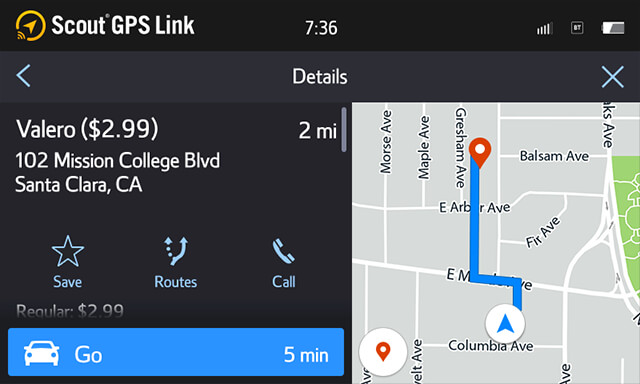
Get all the important information at a glance or tap away on your dashboard. Conveniently access key features, like search, favorites, and one-tap navigation to Home and Work. Always know where you are and where you're going with the interactive map available in both 2D and 3D.
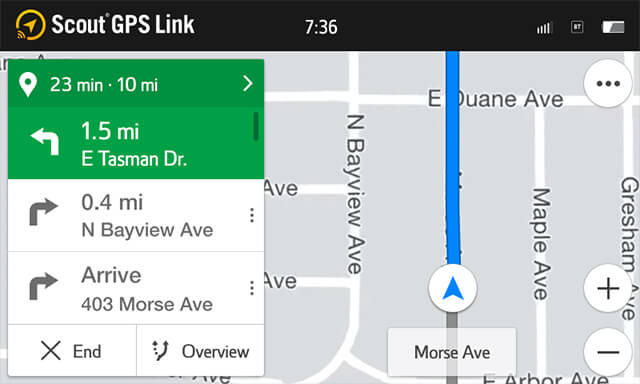
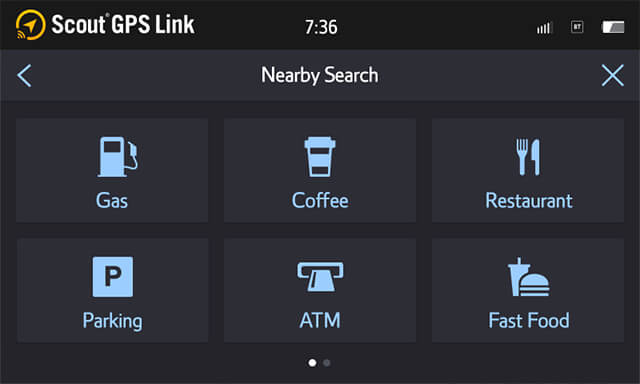

Scout GPS Link’s intelligent One-Box Search makes finding places easier than ever. Easily enter addresses or places and get suggestions as you type. Quickly discover places to dine, shop, get gas, and more with voice commands and popular search categories.

Save all of your favorite places to find them faster when you need them and easily route to your home and work with one-touch navigation on your home screen.
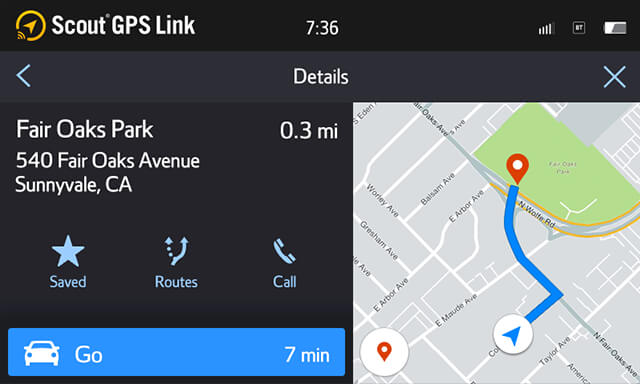


Scout GPS Link makes it easy to get directions even when you’re in other apps, like Yelp and Fuel Prices. Choose your destination and launch right into Scout GPS Link to get there faster.

Get the benefits of navigation with real-time information from the cloud***. Find nearby gas stations with the latest prices, up to three different traffic-optimized route options, and real-time ETA.
Terms and Privacy
scoutgpslink.com © 2017 Telenav Inc. All Rights Reserved